How one task moves through PM, SWE and QA — and how I run several in parallel without babysitting.
Part 2 of 3. Series: building an AI agent team to ship software.
In part 1 I covered why I treat the main session as an orchestrator and split the work across four roles: PM, SWE, QA, On-Call. The roles are the skeleton. This part is about making that skeleton move: how a task runs through the team, how to run several tasks at once without babysitting, and where the state gets recorded.
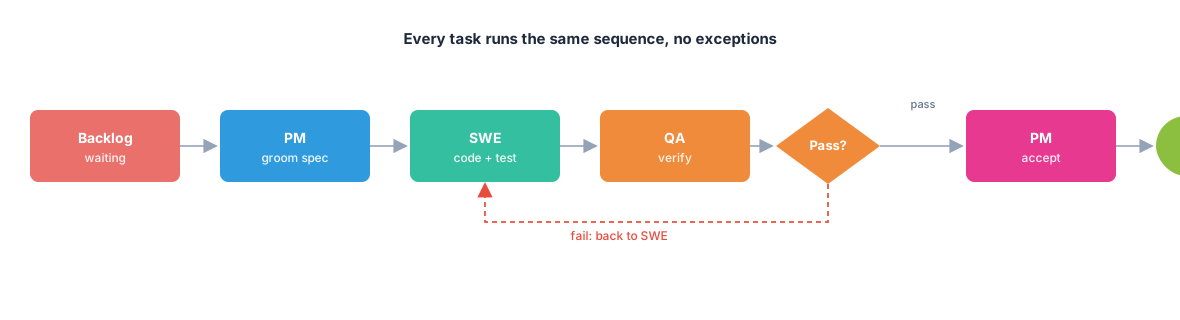
Every task runs the same sequence of steps. I allow no exceptions, not even for small work, because exceptions are where a process starts to crack.
I tell the orchestrator to create a task and push it into the backlog. The PM picks it up and grooms it into a clear spec. The SWE writes code and tests. QA runs the tests, checks each criterion, then calls it pass or fail. On a fail, the task goes back to the SWE to fix. On a pass, the PM steps in one last time to accept it. Only after the PM nods does the orchestrator commit the code and close the task.
The loop tightens in my head like this: PM, SWE, QA, then back to PM before commit.
That "QA fails, send it back to SWE" loop sounds obvious, but it's where I see the real value of separating roles. Because QA is its own role, it has no problem sending a task back. An agent that owns everything tends to wave things through, because a fail means admitting it got its own work wrong. A separate QA has none of that ego. A fail is a fail, with evidence attached.
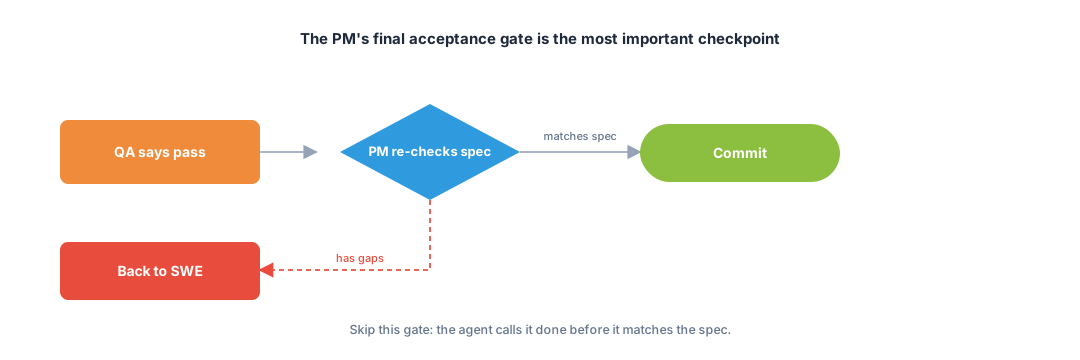
Of the whole sequence, the step that's easiest to drop is the one I guard hardest: the final PM acceptance, after QA has already passed.
A lot of people will ask, if QA passed, what's left to approve?
Because passing all the tests doesn't mean you solved the right problem.
A feature can be flawlessly "done" by every technical measure and still fall apart in a real user's hands. Tests all green, but the flow makes no sense. Or it does exactly what the brief said, while the brief itself didn't match what the person actually needed. Tests only check whether the code does what we told it to do. They can't check whether what we told it to do was the right thing to do.
The final PM step looks straight at that gap. The PM goes back to the original user story and asks: does this result actually serve what the user needs? It's the last line of defense, and it catches exactly the kind of error no test can.
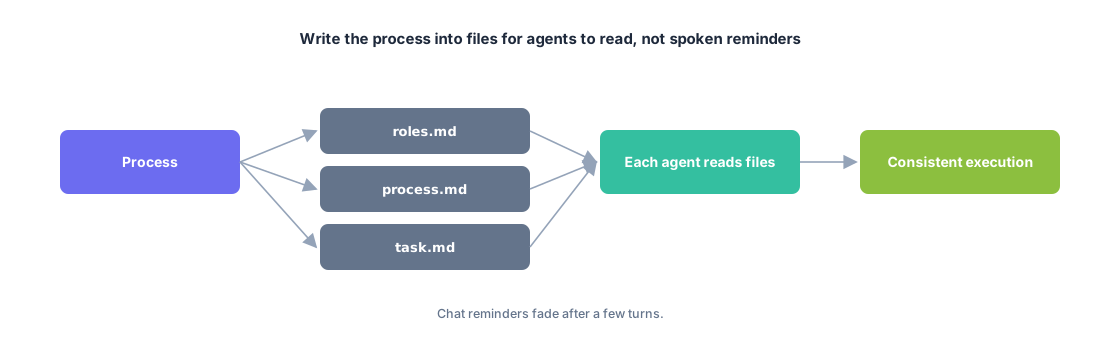
To get the whole team through this sequence consistently, I don't repeat it every session. I write it to a file, right in the repo. The agent reads it and follows it:
PROCESS.md file describing the development flow end to end.CLAUDE.md file with project-level instructions.Writing the process to a file is what makes this whole approach repeatable, the way I like it. Next time I open a new project, I carry the set over as-is. The agent knows right away what role it is, which step it's on, and what "done" means. I don't have to teach it from scratch.
There's a subtle point here that I'll come back to in part 3: when the process lives only in text files, the agent can still ignore a spot or two. A file is guidance, not a hard fence. But even as a file, writing it down beats saying it out loud every single time.
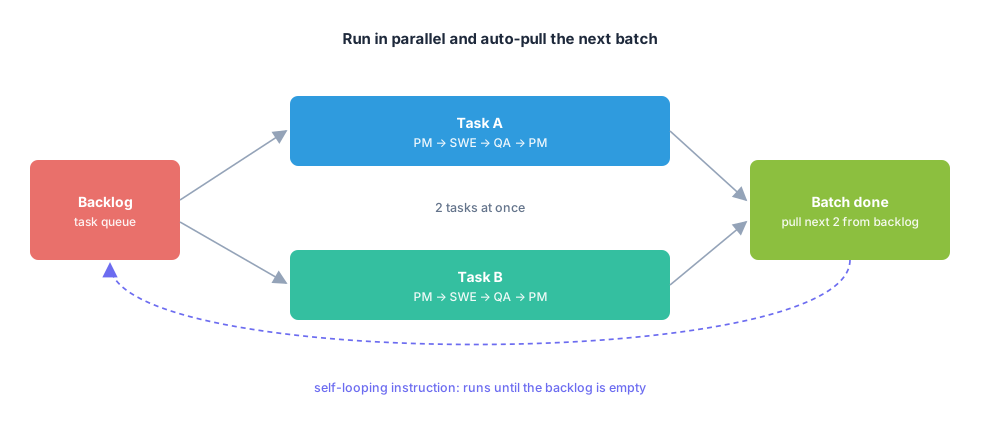
One task at a time wastes time. I usually run two tasks in parallel. When a batch of two finishes, the orchestrator pulls two more from the backlog. Round after round.
Sounds simple, but there's a snag anyone running agents this way hits: the loop dies on its own.
A batch finishes, the orchestrator stops, asks "keep going?" and then sits waiting for me to type. If I'm asleep at midnight, it stands still until morning. A whole night passes and the backlog is still half full. This was one of the most maddening things when I started.
My patch for it is small and effective: plant a looping instruction right inside the task list.
That instruction tells the orchestrator to do two things. One, pull the next batch of tasks. Two, append this same instruction to the end of the list again. So after each batch it reminds itself to pull the next one, then reminds itself again. The loop runs until the backlog is dry, instead of stalling after every batch to wait for me.
This little trick turns a whole night into real working time. I go to sleep with a full backlog, wake up with most of it groomed, coded, tested, and accepted.
But I want to say the attached condition plainly, because it gets lost in the rush of "let the agent run overnight." A self-running loop is only safe when the process above is tight. If you let the agent roll on its own with nobody guarding each step, it'll roll the errors a long way too, and in the morning the cleanup costs you more. Automation and verification have to travel together. Automation without verification just makes garbage faster.
A self-running loop only helps if I can see what it's doing. I use one of two ways to record state.
The first is GitHub Issues. This fits when I want public coordination and I want each agent's report attached to each task. Every issue becomes a full record: the PM writes the requirements, acceptance criteria, test scenarios; the SWE reports the code is done; QA confirms with screenshots of the result. Open an issue and you read the whole history of which hands the work passed through, who did what, and why it passed or failed.
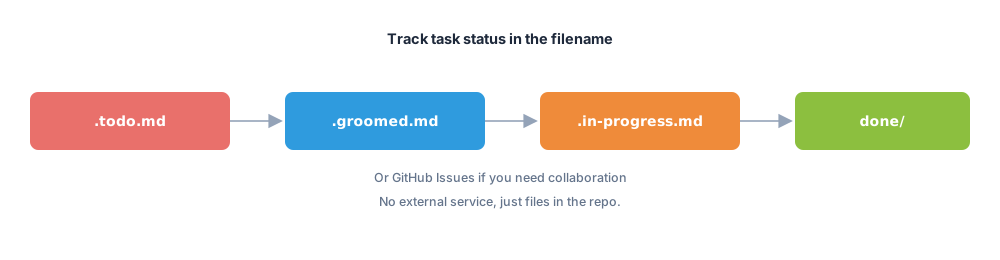
The second is a file-based tracker. Much lighter. The state lives in the filename itself.
A task moves from .todo.md to .groomed.md to .in-progress.md, then finally into a done/ folder. No external service, no network, just files in the repo. Look at the filename and you know where the task sits in the loop.
I pick whichever way based on how public I need to be. A project many people watch gets GitHub Issues. A project I'm doing solo, or one I'm not sure will live long, gets files for speed.
But here's the point that outweighs both options: the tracker is only the place where state gets recorded.
The same loop, PM, SWE, QA, back to PM, runs identically no matter where I record the state. The tracking tool is the notebook. The thing that produces quality is the process around it, the role separation and forcing every task through the full sequence. Switch trackers and the result doesn't change. Drop the process and the fanciest tracker is useless.
That's the how: roles in part 1, process in part 2. In part 3 I take it into the field, across different kinds of projects, including one I botched, and pull out what's left after all of it.
1 to 2 emails a month. Easy to unsubscribe.
1 to 2 emails a month. Easy to unsubscribe.


Comments